JCOM Automation, Notes From The Field
You Can’t Fix What You Can’t See
How a Steel Plant Gained Control of Its OT Network
JCOM Automation’s James Powell on what really happens when you deploy IntraVUE into a sprawling industrial network.
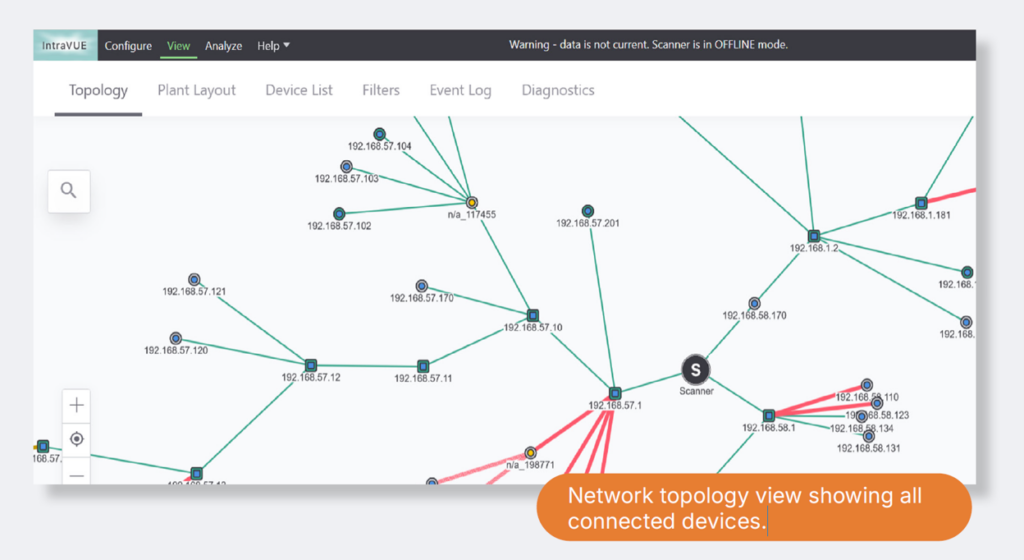
The client operates a large-scale steel facility that has expanded over many years. As the plant grew, so did its network, not through a unified design, but through incremental additions. New lines were connected to existing infrastructure, temporary links became permanent, and over time, the full picture of how everything was interconnected became unclear.
The plant ran on Ethernet/IP with a fully interconnected architecture rather than isolated control domains. While this approach offers operational advantages, it also introduces complexity, particularly when documentation hasn’t kept pace with physical changes.
James was brought in as technical support after the sale. What he found was a sprawling network with no centralized asset visibility. The client had paper-based documentation and a database of IP addresses, but no live view of what was actually connected.
“They literally didn’t know exactly how everything was put together. They had a general idea, but they didn’t have a good database of everybody who was connected.”
A network that grew with the plant
The client operates a large-scale steel facility that has expanded over many years. As the plant grew, so did its network, not through a unified design, but through incremental additions. New lines were connected to existing infrastructure, temporary links became permanent, and over time, the full picture of how everything was interconnected became unclear.
The plant ran on Ethernet/IP with a fully interconnected architecture rather than isolated control domains. While this approach offers operational advantages, it also introduces complexity, particularly when documentation hasn’t kept pace with physical changes.
James was brought in as technical support after the sale. What he found was a sprawling network with no centralized asset visibility. The client had paper-based documentation and a database of IP addresses, but no live view of what was actually connected.
“They literally didn’t know exactly how everything was put together. They had a general idea, but they didn’t have a good database of everybody who was connected.”
A pattern, not an exception
This situation is far from unique. James has seen it across industries ranging from steel and cement to manufacturing. Plants rarely have the luxury of designing their networks from scratch. Instead, they evolve. A section gets added, a bridge between two networks gets built under time pressure, and the quick fix stays in place longer than anyone intended.
James points to an example from his colleague Matthew Avakian at a large cement plant, where severe communication lag between two halves of the facility was eventually traced to a 10 Mbps hub. A piece of legacy hardware, hidden behind a desk, covered in cobwebs, which had been quietly connecting the two networks for years; found by accident.
These aren’t isolated incidents. They’re the natural result of operational pressure: something breaks, it gets fixed fast, and the “temporary” solution becomes permanent infrastructure. James draws a comparison from early in his career at General Electric, where he worked in a building that had been constructed as a temporary structure during World War II. He arrived in 1990, and the building still stands today.
“You’re setting yourself up for a later fall.”
Fully remote deployment, operational in hours
The IntraVUE installation was conducted entirely remotely. The first step was navigating the client’s properly isolated OT environment, which followed the Purdue model. The control network had no direct internet access. James configured a clean machine with virus protection, loaded the software while connected to the internet, then disconnected and transferred it to the OT network.
The initial setup session took two to three hours, including installation, configuration, and a first review of what was appearing. A follow-up session brought the total to roughly four hours.
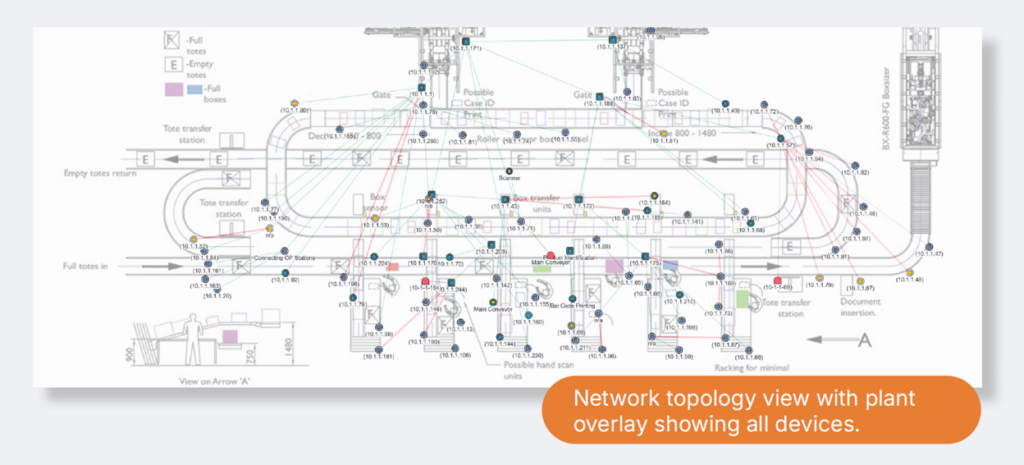
One practical detail stood out: despite the scale of the installation, the database was compact enough to be emailed. This allowed James to review the network topology, identify issues, and coordinate switch reconfiguration work without setting foot on site.
IntraVUE’s adjustable scan speed was a critical factor during deployment. Unlike tools that scan at a fixed rate, IntraVUE allows the operator to control how aggressively it queries the network. James strongly recommends starting on the slowest setting.
“I’m a very cautious engineer. If on slow scan we start seeing a lot of alarms, then we know we don’t want to go faster.”
Lorem ipsum dolor sit amet, consectetuer adipiscing elit, sed diam nonummy nibh euismod tincidunt ut laoreet dolore magna aliquam erat volutpat.
Given the size and complexity of this particular network, the full discovery scan took over a day. A more optimally structured network of the same scale would have been faster, but the result was comprehensive: a complete, live view of every connected asset.
What the scan revealed
IntraVUE uncovered several issues the client was not previously aware of.
Duplicate IP addresses were found across the network. Because the network was so large, the conflicting devices were physically far apart, which meant they didn’t cause outright failures. Instead, they produced intermittent, difficult-to-diagnose behavior: devices that appeared to periodically change MAC addresses, connections that would work erratically. The kind of issue that consumes troubleshooting hours without ever pointing to a clear root cause.
Misconfigured switches were identified, prompting a cleanup effort that JCOM supported remotely. A significant number of unmanaged switches were also discovered; a vulnerability James considers underappreciated across the industry.
“If you have a sprawling network, you really want to get rid of all your unmanaged switches. You’re losing so much diagnostic information. And if you don’t know how everything is interconnected, how are you going to troubleshoot?”
From documentation to decisions
Before IntraVUE, troubleshooting a network issue at this facility meant working through paper records to understand which devices were involved and how they were connected. That process was time-consuming and error-prone, particularly under the pressure of a production stoppage.
With IntraVUE running, the team now has a live, continuously updated view of their entire OT network. If a device joins or drops off, they see it. If communication patterns change, they’re alerted. The software doesn’t replace the expertise of the engineering team — James compares it to a pair of glasses — but it gives them immediate access to information that previously required hours of manual investigation.
The client is already exploring next steps: routing IntraVUE alerts into their HMI system so operators receive notifications directly and evaluating whether to subdivide portions of the network to reduce the blast radius if a section goes down.
Practical takeaways
For James, this deployment reinforces several principles he’s applied throughout his career. Start slowly, both in scanning speed and in expectations. Use the tool to build a baseline understanding before making changes, and don’t underestimate how much a network can drift from its documented state over the years.
“Before IntraVUE, they had a documentation path. Trying to figure out what was involved if part of the system went down would be quite time consuming. Now the software is just going to tell you.”
Ready to See More?
Join Streamline, JCOM Automation, and PRONETIQS on October 19 to see how IntraVUE can provide a clearer view of your industrial network and support faster troubleshooting.
October 19, 2026 | 10 AM MT / 12 PM ET
Register for webinar Need Webinar DetailsThis is a special post from our colleague James Powell, P.Eng of JCOM Automation.