


4next, Endress+Hauser, Helmholz, JCOM Automation, Modbus, Thorsis Technologies GmbH
Simple and Cost Effective Tools for Monitoring Applications
Monitoring Application Introduction
There is a lot of data in factories and process plants that engineers need to monitor, but it is not used for control purposes. This data needs to be updated in seconds, minutes, or hours.
Communications protocols such as PROFINET and EtherNet/IP were both designed to update all data in milliseconds, and they have to be updated in milliseconds. This means you must have a fairly sophisticated device to handle the communications. However, Modbus can have devices update once a second to even once an hour or day. This, combined with the fact that the protocol is easy to implement, means that the device itself can be a lot simpler and, therefore, have a lower cost.
And one more thing—typically, devices that we want to monitor will already have either Modbus RTU or Modbus TCP on board.
Application 1: Monitoring temperature, level and flows in a storage tank.
Solution 1:
In this solution, we will use HART-enabled Temperature, level, and flow transmitters to monitor the values. We have these devices wired into a HART to Modbus TCP gateway called isNet lite. They are then connected using Helmholz unmanaged switches, going back to an HMI with a Modbus TCP driver.

In the HMI, we can set it up to poll the data once every minute. Maintenance can also troubleshoot any of the transmitters by using PACTware or SIMATIC PDM to go over Ethernet and through the Modbus to HART gateway and get right to the instrument. If maintenance was an issue with one of the instruments, then this feature could easily pay for itself.
This solution could easily be done with PROFINET using all the same components. However, with the Modbus TCP version, you do not need a PLC. Your HMI can pull the information directly. Also, because you are only pulling the information once a minute, this application is not really contributing to the overall netload of your network.
Solution 2:
In this solution we will use 4-20mA instruments for level and flow. For temperature, we will use a RTD. These devices are then wired into a 4next Modbus RTU I/O rack. We then wire this I/O rack using Modbus RTU over RS-485 into a 4next Modbus Wireless radio gateway. The Wireless radio would then link the information back to the HMI. The distance between the radios can be up to 1 Km depending on obstacles.

This solution is far more cost-effective than the first from a capital/installation cost point of view. However, depending on the cost of maintenance, the first one could end up cheaper in the long run. Which solution is better would really depend on the site.
Application 2: Monitoring data from older devices
Factories and process plant automation and monitoring systems develop over time. Often, there are many variables that need to be monitored, but they are only available from a special display at one section of the plant.
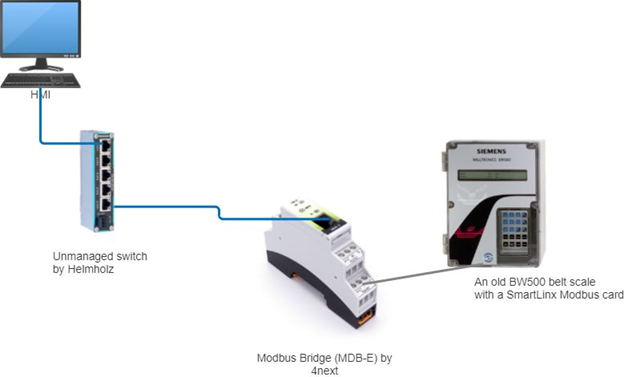
If the device has Modbus TCP on board, it is very easy to connect it to the main intranet and pull the data. However, if the device only has Modbus RTU, it is a fair bit of work to wire it back to a PLC and get the data that way. The easier solution is to use an Ethernet to Modbus gateway. 4next has a very easy-to-use Modbus TCP to Modbus RTU gateway (MDB-E). You set it up using a web browser.
In the example below, we have an old BW500 belt scale with its own display. The staff have been monitoring the values by going up to the unit, and looking at the display and writing down the value. It works but is not very efficient. In addition, sometimes the readings get lost. Management decided that they wanted this value on their HMI and also logged in their data historian. The easiest way to get this information back is to use the Modbus RTU interface card available for the BW500. We then wire this via RS-485 back to a Modbus Bridge MDB-E by 4next which will convert Modbus RTU to TCP. The setup is easy and can be done in a matter of minutes.
These Modbus applications are in many locations in factories and process plants.
Conclusion: If any of these applications interest you or if you have your own application that you want to discuss with us, please contact us.
How do you learn about Modbus?
Modbus.org has a lot of free information on Modbus. In general, there are many websites with Modbus information, and there are also many books on this topic.
As for formal training, there is only one that we know of, which is our course called Modbus Troubleshooting and Maintenance. Like our other Troubleshooting and maintenance courses, this course is focused on the practical aspects of the protocol. It has many hands-on exercises to show you how the protocol works and what issues you may run into.
Read our blog posts exploring Modbus:
1. Yes, we still use Modbus. An enduing legacy you need to know.
2. Monitoring Application
3. Data Logging Application
4. Controlling Slow Application (coming up)
This is a special post from our colleague James Powell, P.Eng of JCOM Automation.